With the growing adoption of digital transactions worldwide, mobile phones, computers, and other terminal devices have become the core tools for conducting online financial operations.
Device security naturally serves as the first line of defense for online transactions. However, in reality, incidents involving stolen funds and information leaks due to device security issues are common, causing tangible financial losses for ordinary users.
Why is device security so important?
Inadequate device protection leading to security vulnerabilities
● In 2014, a large number of bank customers in Germany and Austria had their computers infected with the Emotet banking trojan. The malware spread via malicious links in spam emails, directly stealing users’ online banking login credentials and leading to widespread account information breaches.
● From late 2025 to early 2026, over 223 sellers on a Singaporean second-hand trading platform fell victim to scams after clicking fake payment links on unprotected phones or computers. They were directed to highly realistic phishing pages mimicking banking sites, where they entered their account credentials and verification codes, resulting in a total loss of over S$622,000.
Operational negligence resulting in information leaks
● In January 2026, numerous fake public Wi-Fi hotspots were detected at Moscow’s Sheremetyevo Airport. Several travelers connected to these unsecured networks on their devices without enabling network protection, leading to the theft of their associated bank account information and funds.
● In February of the same year, a resident in the Swiss canton of Schwyz, whose computer lacked any security protection, was tricked into installing a fake software that was actually a remote-control program. The scammer then logged into the victim’s online banking and transferred nearly CHF 500,000.
Scammers exploit these weak points in device security, using various technical means to steal information, take over accounts, and ultimately commit online transaction fraud.
What online transaction security issues can arise from using an insecure device?
If you use unprotected or poorly secured devices like phones or computers and lack sufficient security awareness, you may face information theft, account takeover, and financial loss.
● Theft of sensitive information from the device
Malware such as trojans or keyloggers can be installed on unprotected devices, or unauthorized access can be obtained, leading to the covert theft of sensitive data like account passwords, bank card details, SMS verification codes, and transaction records.
● Device network session hijacking
Connecting to insecure networks can allow attackers to sniff account login sessions and transaction data. Scammers can then take over accounts without credentials to initiate unauthorized transfers and purchases.
● Control of the device’s linked SIM card
If the SIM card lacks security settings, scammers can use leaked information or a lost device to request a replacement or clone the SIM card, intercept verification codes, and bypass two-factor authentication.
● Installation of fake or malicious apps
Downloading and installing imitation financial apps or cracked software from unofficial sources can lead to direct theft of account information, stored card photos, or background manipulation of the device.
● Unauthorized granting of dangerous permissions to the device
Granting high-risk permissions—such as SMS reading, contact access, screen recording, or remote control—to untrusted apps can allow scammers to obtain verification codes in real time or spy on operations.
● Bypassing of device account verification mechanisms
Using weak or reused passwords across multiple platforms, or not enabling strong authentication, makes it easier for attackers to gain login credentials via brute force or credential stuffing attacks.
● Information leakage after device loss or theft
If the device lacks a lock screen password or PIN, anyone can directly access financial apps and stored sensitive information to initiate transfers or fraudulent payments.
What techniques do scammers use to steal your transaction information?
Unlike purely social engineering scams, these attackers often possess strong hacking and technical skills. Their methods focus on breaching the user’s device security—without such vulnerabilities, the attacks cannot proceed.
● Malicious apps / malware installation
Users are tricked into downloading fake banking, payment, or investment apps, or cracked tools from social media links or unofficial app stores. Once installed, malware runs in the background to steal passwords, verification codes, and bank details, or to remotely control the device.
● Insecure network sniffing
Users are lured into performing transfers or logging into online banking over public free Wi-Fi. Attackers use sniffing tools to capture transmitted account credentials and transaction data, or to hijack active sessions.
● Tricking users into granting high-risk permissions
Under pretexts like “remote assistance,” “refund verification,” or “claiming rewards,” users are persuaded to grant SMS access, screen sharing, or remote control permissions to untrusted apps or mini-programs, enabling real-time spying.
● SIM card hijacking / cloning
Using leaked personal information or taking advantage of a lost device, scammers contact the carrier to request a SIM replacement or clone the card. This allows them to intercept verification codes and bypass two-factor authentication.
● Phishing via fake websites on the device
Users are directed to click unfamiliar links in their device’s browser, leading to fake websites that mimic legitimate banking or e-commerce platforms. Without URL verification or security software warnings, users enter their credentials, which are stolen in real time.
● Credential stuffing / cracking weak passwords
Using weak or reused passwords, automated tools attempt credential stuffing or brute force attacks to obtain login details, enabling direct account access from the user’s or another device.
● Theft of information stored on the device
If the device is unencrypted and stores photos of bank cards, IDs, or written passwords in notes or galleries, this data can be easily stolen if the device is compromised or lost.
What methods can help prevent security issues in daily transactions?
1. Implement basic security for the device and system
● Set strong passwords, fingerprints, or facial recognition for phone and computer access. Enable immediate encryption after screen lock on phones and disk encryption on computers.
● Update system firmware and security patches promptly. Disable “install from unknown sources” on phones and unauthorized remote desktop access on computers.
● Enable “Find My Device” on phones and built-in device location/remote wipe on computers. If the device is lost, remotely lock it, erase financial app data, and suspend accounts.
● Avoid lending your device or granting access to strangers. Shield the screen in public to prevent password or code theft.
2. Regulate app sources and strictly control permissions
● Download apps only from official stores or the official websites of banks and payment providers. Avoid installation packages from social links or unknown sites.
● Grant only necessary permissions (like network or camera) to trusted financial apps. Deny high-risk permissions such as SMS access, contacts, screen recording, remote control, or file access to unknown apps. Regularly review and remove unused permissions.
● Uninstall fake, cracked, or unknown apps. For unused financial apps, close accounts or unlink bank cards.
● After installing an official app, verify the developer information and official badges. Be alert for look-alike apps and report them.
3. Strengthen passwords and account verification on the device
● Use unique, strong passwords (8+ characters with letters, numbers, symbols) for financial apps. Avoid reusing passwords.
● Enable in-app secondary passwords, fingerprint, or facial recognition for financial apps.
● Enable multi-factor authentication, preferring hardware tokens or device-bound codes over SMS. Set up login alerts for new devices.
● Avoid storing passwords, codes, or card details in device notes, galleries, or text files. Use offline encrypted notes if needed.
4. Secure the device’s network environment
● Avoid using public Wi-Fi for financial operations. If necessary, use it only for non-sensitive browsing.
● Enable encrypted mobile data on phones. Use a reputable VPN on public networks for computers. Turn off Bluetooth and NFC when not needed.
● Install reputable security software with phishing and malicious link blocking.
5. Set up SIM card security to protect verification codes
● Set a SIM PIN to prevent unauthorized use if the card is removed. If the SIM is lost, contact the carrier immediately to suspend it and notify banks.
● Avoid leaking your phone number’s linked account details. Before changing numbers, unlink the old number from all financial services.
● Enable SIM change alerts from your carrier.
6. Protect against malware and regularly scan for threats
● Install and update legitimate antivirus software. Perform weekly full scans, focusing on financial app directories and recent downloads.
● Avoid clicking links or attachments in unknown messages, especially files with .exe or .apk extensions.
● Be cautious with QR codes. Verify links using built-in scanners in WeChat or Alipay before proceeding.
7. Respond quickly to device abnormalities to minimize losses
● If the device behaves oddly (slows down, shows pop-ups, sends unknown texts), disconnect it from the network, run a full scan, and uninstall recently added suspicious apps.
● If the device is lost or stolen, contact the carrier to suspend the SIM, then use another device to freeze accounts, change passwords, and remove the lost device’s access.
● If malware is detected or information is leaked, change all financial passwords, disable online/overseas payments, contact your bank/payment provider for protection, and review recent transactions.
What should a transaction-secure device feature?
System level:
● Official, unmodified OS (e.g., iOS, stock Android, genuine Windows) with no pre-installed malware or unofficial modifications.
● Regular firmware and security updates for at least 3–5 years to patch known vulnerabilities.
● A closed system (like iOS) or robust security settings (like customized Android from major brands) that restrict background activity and data access for unknown apps.
Hardware level:
● Built-in financial-grade security chips (e.g., Apple’s Secure Enclave, Android TEE, computer TPM 2.0) for hardware-encrypted storage of sensitive data.
● Reliable biometric sensors (fingerprint, 3D face recognition) for device unlock and app authentication.
● Support for SIM PIN encryption and full-disk encryption (BitLocker on computers, automatic lock-screen encryption on phones) to protect data if the device is lost.
Privacy and permissions:
● Per-app permission controls for high-risk access (SMS, remote control, screen recording, files), with usage logs.
● App sandboxing to isolate financial app data from other apps.
● Built-in app lock or private space for financial apps.
Network:
● Support for the latest security protocols (WPA3 for Wi-Fi, encrypted mobile data) with warnings for fake or unsecured networks.
● Basic network protection (phishing/malicious URL blocking, anti-sniffing) compatible with third-party security software.
● Easy on/off for Bluetooth and NFC, with protection against unauthorized nearby connections.
Emergency response:
● Built-in device management (Find My iPhone, Find My Device, Windows Find My Device) for remote location, lock, and data wipe that cannot be disabled by third-party apps.
● Activation lock or anti-theft protection (e.g., Apple ID lock, BIOS password) to prevent reuse after reset.
● SIM card security features, such as carrier alerts for replacement and isolated verification code storage.
Apps:
● Official app store with strict review processes for financial apps, preventing fake ones.
● Default blocking of installations from unknown sources, with warnings and manual authorization required.
● Verification of installed apps (developer signatures, official badges) and alerts for imitations.
Is “isolation” really a good solution?
Using encryption, strict permission controls, and a secure isolated system appears to be an effective approach, creating a differentiated security framework from lightweight anonymous protection to deep device hardening and financial-grade physical isolation. But how exactly do the security logic and implementation work?
Hardware-level security foundation:
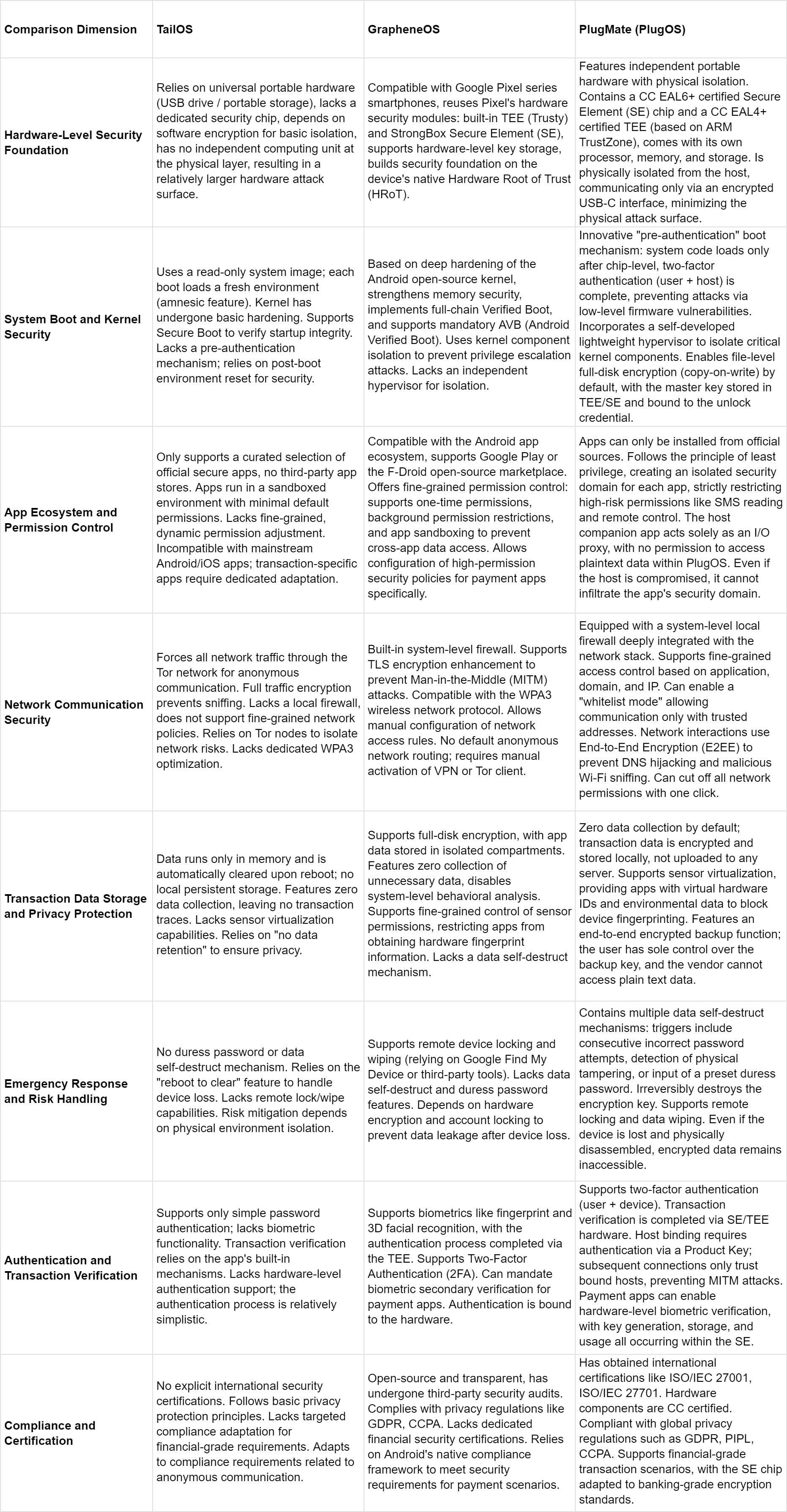
● TailOS: Built on universal portable hardware like USB drives, with no dedicated security chip. Relies on software encryption for basic isolation and lacks a separate physical computing unit, making it the most vulnerable to hardware attacks.
● GrapheneOS: Designed for Google Pixel devices, leveraging native hardware security modules like Trusty TEE and StrongBox SE. Uses hardware-based key storage and hardware root of trust (HRoT) for a software-hardware integrated defense.
● PlugOS: Uses a dedicated portable hardware design with physical isolation. Includes a CC EAL6+ certified SE chip and a CC EAL4+ TEE based on ARM TrustZone, along with its own processor, memory, and storage. Communicates with the host only via an encrypted USB-C interface, minimizing physical attack surfaces and offering the highest hardware protection.
System boot and kernel security:
● TailOS: Uses a read-only system image with amnesic design—each boot loads a fresh environment. The kernel has basic hardening and supports Secure Boot but lacks pre-authentication, relying on environment resets.
● GrapheneOS: Deeply hardens the Android open-source kernel with memory safety enhancements, full Verified Boot, and mandatory Android Verified Boot (AVB). Uses kernel component isolation but no dedicated hypervisor for further separation.
● PlugOS: Implements a “pre-authentication” boot requiring chip-level two-factor authentication (user + host) before loading the system, preventing low-level firmware attacks. Includes a lightweight hypervisor for strict kernel component isolation, file-level full-disk encryption with keys tied to user unlock credentials, and offers deeper defense in depth.
App permission control:
● TailOS: Extremely restricted app ecosystem with only curated official apps. Runs apps in isolated sandboxes with minimal permissions by default but lacks fine-grained dynamic controls and isn’t compatible with mainstream Android/iOS apps.
● GrapheneOS: Fully compatible with Android apps via Google Play or F-Droid. Offers fine-grained permissions (one-time, background restrictions), sandboxing to block cross-app data access, and customizable high-security policies for banking/payment apps.
● PlugOS: Provides an official app store and supports Google Play, with warnings for unknown APK installations. Follows least privilege, creating isolated security domains per app and restricting high-risk permissions. The host-side companion app acts only as an I/O proxy with no access to plaintext data inside PlugOS, isolating host-side risks entirely.
However, if users ignore warnings and install unknown APKs, the system could still be compromised.
Network communication security:
● TailOS: Focuses on anonymity, routing all traffic through Tor for encrypted, anonymous communication. No local firewall or fine-grained network policies; relies on Tor nodes for isolation.
● GrapheneOS: Includes a system firewall, TLS enhancements, and WPA3 support. Users can set custom rules but need manual VPN/Tor for anonymity.
● PlugOS: Integrates a deep system firewall with fine-grained controls (by app, domain, IP) and a strict whitelist mode. All external communication uses end-to-end encryption (E2EE) to prevent DNS hijacking and Wi-Fi sniffing. Supports one-click network cut-off.
Transaction data storage and privacy:
● TailOS: No local persistent storage; data exists only in memory and is wiped on reboot. No data collection but lacks sensor virtualization.
● GrapheneOS: Full-disk encryption with isolated storage per app. No unnecessary data collection, disabled system analytics, and fine-grained sensor controls to limit hardware fingerprinting. No dedicated self-destruct mechanism.
● PlugOS: No data collection; all transaction data is encrypted locally. Uses system-level sensor virtualization to provide fake hardware IDs and block device fingerprinting. Offers E2E encrypted backups with user-controlled keys.
Emergency response and risk handling:
● TailOS: No duress password or data self-destruct. Relies on “reboot to wipe” for risk mitigation. No remote lock/wipe.
● GrapheneOS: Supports remote lock/wipe via Find My Device or third-party tools. Uses hardware encryption and account locks but no self-destruct or duress password.
● PlugOS: Multiple self-destruct triggers (wrong password attempts, physical tampering, duress password). Irreversibly destroys encryption keys. Supports remote lock/wipe; data remains inaccessible even if device is disassembled.
Authentication and transaction verification:
● TailOS: Simple password-only authentication; no biometrics. Relies on in-app verification without hardware support.
● GrapheneOS: Supports fingerprint/3D face recognition via native TEE, two-factor authentication (2FA), and mandatory biometric verification for financial apps.
● PlugOS: Two-factor authentication (user + device) with SE/TEE handling core verification. Requires initial pairing with host via product key. Financial apps can use hardware-based biometrics with keys generated, stored, and used entirely within the SE chip.
Compliance and certifications:
● TailOS: No major international security certifications; follows general privacy principles.
● GrapheneOS: Open-source with third-party audits. Complies with GDPR, CCPA, and Android’s payment security framework but lacks dedicated financial-grade certifications.
● PlugOS: Certified for ISO/IEC 27001, ISO/IEC 27701, and hardware components with CC certification. Complies with GDPR, China’s PIPL, CCPA, and meets banking-grade encryption standards.
For a clearer comparison, see the chart below:
Choosing a secure device also requires security awareness
In summary, you can choose based on your specific needs:
● TailOS focuses on anonymity and temporary secure environments, suitable for low-sensitivity transactions where anonymity is key.
● GrapheneOS balances compatibility and security for daily, moderate-value transactions on Android.
● PlugOS offers the highest level of security through physical isolation and financial-grade hardware encryption, designed for high-sensitivity transactions like large transfers or digital asset trading, ideal for high-net-worth individuals such as investors and business owners.
Finally, beyond choosing secure devices, maintain scam awareness during transactions: don’t trust unsolicited requests, avoid clicking unknown links, and refrain from downloading risky software. Always double-check that you’re on legitimate platforms when entering account details or passwords.